
Replace Excel with custom software: Somewhere along the way, your spreadsheet became your company’s system.
Replacing Excel with custom software is worth it when several people depend on the same file every day and retyping, searching and broken formulas keep costing you time. If one person keeps a tidy spreadsheet and it does the job, keep it and spend the money elsewhere.
- We clean up your data and move it across
- A small first version, then further stages
- The data and access stay yours
Final_v7_REAL.xlsx can finally rest.

Instead of promises, finished work.
Projects that fit this service. You can open each one.
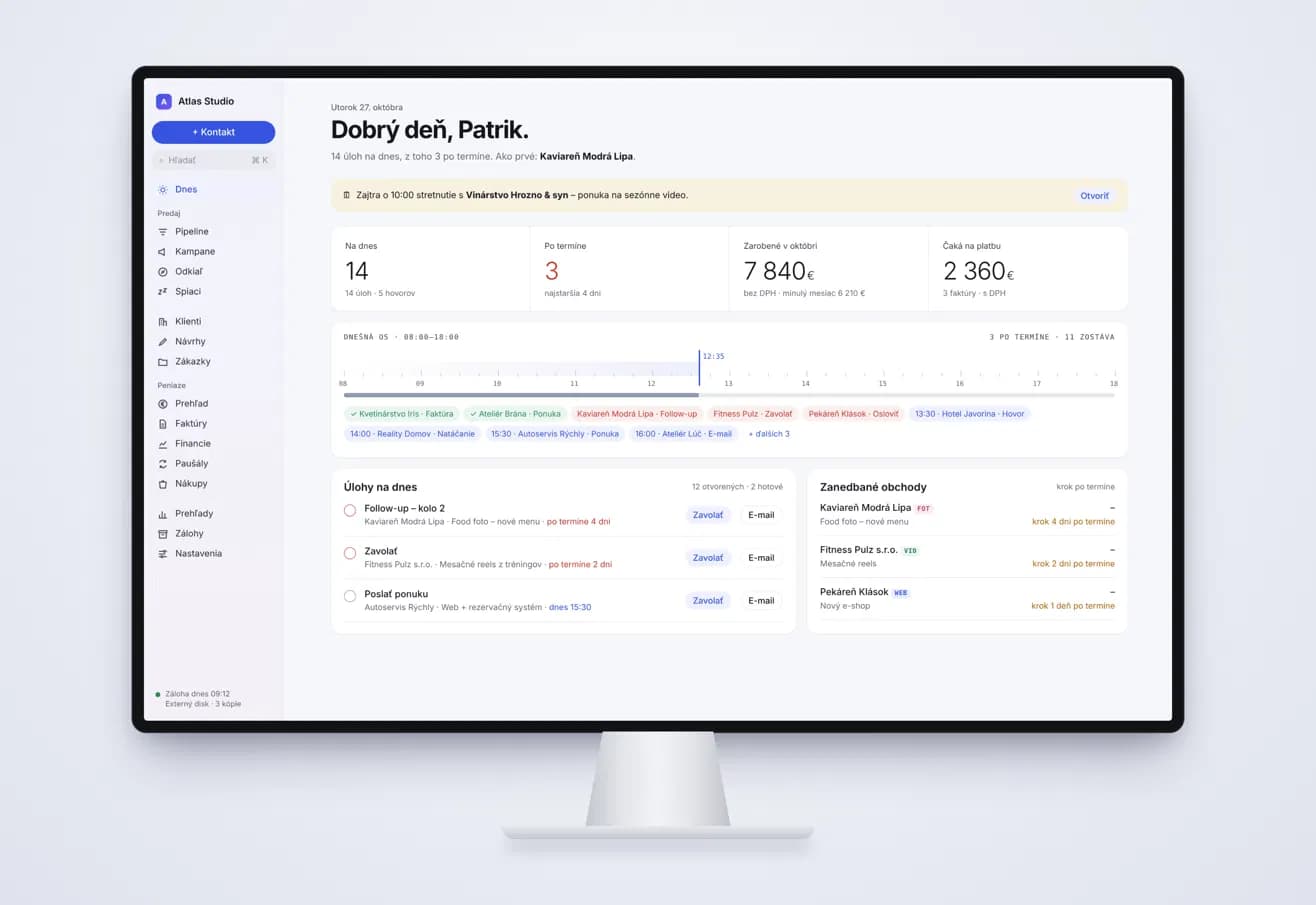
What the spreadsheet turns into.
One set of data, not five copies
Everyone works in the same place, so the question of which file is current goes away.
Entry screens with rules
A date has to be a date and a status comes from a list, so bad data stops at the door.
Status and history on every job
Each order or job has a status, a person responsible and a history, so nothing depends on one colleague’s memory.
Access by role
People see what their role allows, which a shared file password never managed.
Reports with a CSV export
Figures such as unpaid invoices or days to payment are on screen when you ask, and the export opens in Excel.
Your old data, cleaned up
We tidy your spreadsheets and move the data across, so you do not start with an empty system.
A tidier spreadsheet, a ready-made tool or your own system?
Tidy the spreadsheet
Lock the formulas, add drop-down lists and make one person responsible for the file. It costs almost nothing and lasts longer than most people expect on short lists with one or two users.
Buy a ready-made tool
Airtable, Smartsheet, monday.com and similar products are the usual Excel alternative for business. Setup is quick, and they are a good answer while your process fits what the tool expects.
Build your own system
It costs the most at the start and needs your time for the brief. In return, the software follows your process and grows one stage at a time. It makes sense once the process is settled and the spreadsheet is what holds you back.
Custom software or an off-the-shelf tool?
| Custom software | Off-the-shelf tool (Airtable, Smartsheet, monday.com) | |
|---|---|---|
| Your process | Screens, fields and rules follow how you work. | You work within the structure the tool offers. |
| Getting started | Screen designs first, and the quote gives the date of the first part. | Often the same day, if you or a colleague sets it up. |
| Moving from Excel | We clean up and move the data as part of the project. | Usually a spreadsheet import, and the clean-up is yours. |
| Connections | Your website, invoicing, email or Google Workspace, where the tool has an API. | What the vendor supports, sometimes only on higher plans. |
| Cost shape | Higher up front for design and development, with paid third-party services listed separately. | Low to start, then a subscription that often grows with users. |
| If you stop | The data and access are yours, and once paid you use the system with no time limit. | You can usually take an export with you, but the screens and automations stay behind. |
This is a general comparison, and these tools change often. Keep Excel for analysis and let the new system run the daily list.
From spreadsheet to web app, one stage at a time.
The numbers are rarely the hard part. The habits inside the file are. A real order list has merged cells, three spellings of the same client, a colour that means “unpaid” and a column only one person understands. So we read the files with you, agree what each column means and what can be left behind, then clean the data up and move it, from the spreadsheets or from an export of an older system.
You do not need to replace the whole file in one go. A small first version takes over the part that hurts most, often the job list, while the rest stays in Excel for now. Later stages follow once you have seen what works, and the quote gives the exact scope and dates.
We run on our own internal system every day. In the morning it is clear what is overdue, invoices and payments land on the right client and job without anyone pairing them by hand, and last year’s job is found by its code at the first attempt.
When Excel is still the right tool.
Replace it when
- Several people need the same file every day and keep getting in each other’s way.
- Only one person understands the formulas and macros, and their holiday is a risk.
- The same client or job is typed into more than one sheet.
- You tried a ready-made tool and still keep a spreadsheet next to it.
Keep Excel when
- One or two people use the file and keep it tidy.
- You mostly calculate and analyse rather than track work through stages.
- The process is still changing every few months. Test it in the spreadsheet or a ready-made tool first.
- A ready-made tool already covers most of what you do. Buy it, and we will tell you so.
How a spreadsheet becomes a system.
- 01
Open the file together
You show us the spreadsheets and forms you use today, and we go through the work behind them.
- 02
Screens and a written quote
Before development starts, you approve the screen designs and know the scope, the price and the date of the first part.
- 03
A small first version
We replace the most painful part first and show you working screens as we go.
- 04
Data, training and the rest
We move the cleaned data, show your people how to use the system, and add further stages as needed.
Questions before you start.
When is it time to stop using Excel?
When the file has more than one regular editor and mistakes or searching take real time every week. One tidy file with one owner is not a problem to solve.
How much does it cost to replace a spreadsheet?
It depends on the number of screens, user roles and rules, and on how messy the data is. A smaller first version keeps the start manageable. Written quote within 24 hours of a short call.
Will we lose our formulas and macros?
Not the ones you need. We go through them with you, build the ones that matter into the system as rules, and the quote says which are in scope.
Can we still get our data back into Excel?
Yes. A CSV export, like the one in our own system, opens straight in Excel, so you can keep analysing there. Only the daily data entry moves into the new system.
Do we need to be in Bratislava?
No. We work online over Google Meet, with calls in English or Slovak, and meet in person only in Bratislava.
You may also want to see.
Next step
Send us the spreadsheet everyone is afraid to touch.
A short description or a sample without real customer data is enough. We will tell you plainly whether to tidy it up, buy a tool or build your own. Written quote within 24 hours of a short call.